This is an old revision of the document!
Table of Contents
irvingi{01..08}
Summary
We have 8 irvingi systems currently being used as LXC or KVM hypervisors. They're either running gitbuilders or Jenkins slaves for jenkins.ceph.com. They are custom-built SuperMicro chassis with a single PSU.
Hardware Specs
| Count | Manufacturer | Model | Capacity | Notes | |
|---|---|---|---|---|---|
| Chassis | N/A | Supermicro | SYS-1028R-TDW | N/A | |
| Mainboard | N/A | Supermicro | X10DDW-i | N/A | |
| CPU | 2 | Intel | Xeon(R) CPU E5-2620 v3 @ 2.40GHz | N/A | ARK |
| RAM | 4 DIMMs | Samsung | M393A2G40DB0-CPB | 16GB | 64GB total |
| HDD | 0 | ||||
| SSD | 2 | Intel | SSDSC2BB240G4 | 240GB | |
| NIC | 2 ports | Intel | I350 | 1Gb | On-board |
The irvingi have 8x 2.5“ drive bays per chassis.
BIOS Update
WARNING: I had to hand modify/rename the /etc/sysconfig/network-scripts/ifcfg files after this BIOS update. udev changed the name from enp11s0f0 to enp8s0f0. I also lost access to the BMC Java KVM so make sure you can get SOL access to the machine/OS.
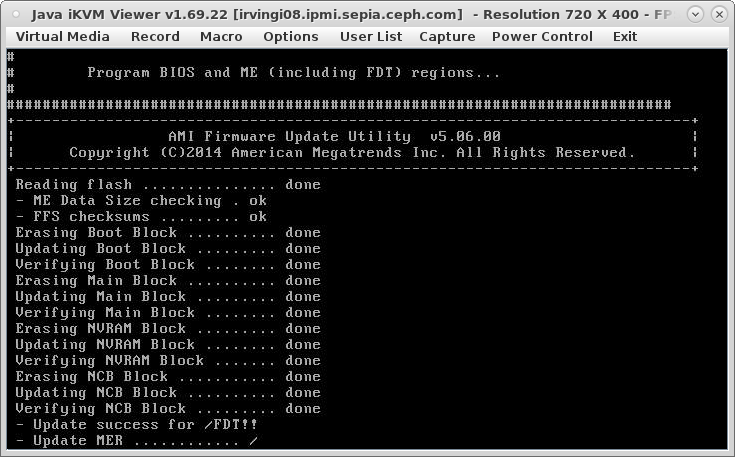
The Supermicro X10 series BIOS can only be updated in a UEFI shell, Windows, or DOS prompt. I roughly followed this guide to create a bootable DOS image with the BIOS embedded. Here's a brief rundown.
# Download and unzip the BIOS zip file somewhere... then:

wget http://www.fdos.org/bootdisks/ISO/FDOEMCD.builder.zip
unzip FDOEMCD.builder.zip
cp -r /path/to/BIOS/ /path/to/FDOEMCD/CDROOT/
cd /path/to/FDOEMCD/CDROOT/BIOS/DOS/
mv AFUDOSU.SMC AFUDOS.EXE
mv CHOICE.SMC CHOICE.EXE
mv FDT.smc FDT.EXE
cd /path/to/FDOEMCD
mkisofs -o irvingibiosupdate.iso -p "Silicon Mechanics Support" -publisher "www.siliconmechanics.com" -V "SiMech OEM CD" -b isolinux/isolinux.bin -no-emul-boot -boot-load-size 4 -boot-info-table -N -J -r -c boot.catalog -hide boot.catalog -hide-joliet boot.catalog CDROOT
I then copied irvingibiosupdate.iso to cobbler.front.sepia.ceph.com:/samba/anonymous and mounted it via the irvingi BMC Web UI and booted to it. Run flash.bat $FW_BIN_FILE. The system will check if a firmware update is needed and put the system board in [Flash Mode] if needed. The system will reboot. Boot back into FreeDOS and run the flash.bat script again.
Basically, read the README and follow prompts.